Device and Data Context (DDC)
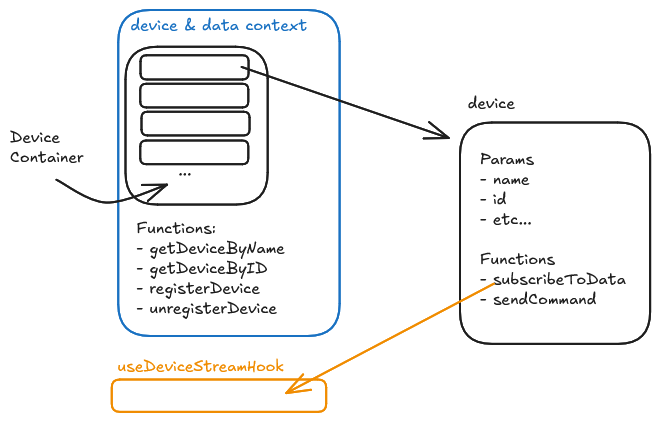
The DDC architecture is designed to handle high-frequency data streams (500Hz+) without freezing the React UI. It uses a decentralized approach where the Context manages Connections, but devices manage their own Data.
Higher Level Overview
- DDC (Context): Acts as a container. It stores references to active device instances.
- Device Classes; BaseDevice and children: The abstract device template. It defines behavior that all devices should obey, inncluding default functions.
- Depending on the DeviceClass, logic is impleented to talk to hardware or other software (BLE, UDP, etc.).
- Hooks: Specialized React hooks couple between the non-reactive Device classes and the React UI.
The DDC Implementation
The DeviceProvider wraps your application and holds the single source of truth for which devices are currently instantiated.
// src/contexts/DDC.tsx
import React, { createContext, useContext, useState, useCallback } from 'react';
import type { BaseDevice } from '../DeviceProfiles/baseDevice';

interface DeviceContextValue {
    /** The raw map of all registered devices. Key: deviceId */
    devices: Map<string, BaseDevice>;

    /** Helper to find a device by its human-readable name */
    getDeviceByName: (name: string) => BaseDevice | undefined;

    registerDevice: (device: BaseDevice) => void;
    unregisterDevice: (deviceId: string) => void;
}

// ... Provider Implementation ...

export const useDeviceContext = () => {
    const context = useContext(DeviceContext);
    if (!context) throw new Error('useDeviceContext must be used within DeviceProvider');
    return context;
};
- When accessing something such as the
deviceslist or thegetDeviceByNamefunction, you would need to access them through theuseDeviceContexthook.
*See #accessing-data-coupling-frontend-and-backend for more details.
Creating & Registering Devices
Devices are not created by the Context. They are created by the UI (e.g., ConnectionsPage) using a Factory Pattern defined in the Device Registry.
- Registry (
DeviceRegistry.ts): Defines available device types (e.g., "Simulated Sine", "EMG Watch"). - Factory (
create): Instantiates the class (e.g.,new SimulatedDevice(...)). - Registration: The UI calls
registerDevice(instance)to add it to the DDC.
// Example: Creating a device in ConnectionsPage
const { registerDevice } = useDeviceContext();

const handleAddDevice = (typeId: string, hardwareId?: string) => {
    const def = AVAILABLE_DEVICES.find(d => d.id === typeId);

    // 1. Create Instance
    const device = def.create(uniqueId, hardwareId);

    // 2. Register to DDC
    registerDevice(device);
};
Accessing Data (coupling Frontend and Backend)
React cannot "see" inside a TypeScript class instance. We use hooks to bridge the gap.
Getting Device Information with Hooks
1. useDeviceStream (Data Hook)
- Purpose: Read high-speed data (500Hz).
- Mechanism: Uses a
useRefto store the latest packet without triggering re-renders. - Usage: UI components poll this ref (e.g., in a
requestAnimationFrameloop) to draw graphs smoothly at 60fps.
const Visualizer = () => {
  const { getDeviceByName } = useDeviceContext();
  const device = getDeviceByName("EMG Watch");

  // Get the Ref (Updates silently at 500Hz)
  const dataRef = useDeviceStream(device);

  useEffect(() => {
      const loop = setInterval(() => {
          if (dataRef.current) {
              console.log("Latest Value:", dataRef.current.rawData);
          }
      }, 16); // 60fps UI update
      return () => clearInterval(loop);
  }, []);

  return <div>Visualizing...</div>;
}
2. useConnectionState (Status Hook)
- Purpose: Monitor connection health (Connected/Disconnected).
- Mechanism: Uses
useStateto trigger a re-render whenever the status changes. - Usage: Buttons, Badges, Error Messages.
const StatusBadge = ({ device }) => {
    const { isConnected, state } = useConnectionState(device);

    return (
        <Badge color={isConnected ? 'green' : 'red'}>
            {state}
        </Badge>
    );
};
Base Device Architecture
All devices extend BaseDevice. This ensures they all speak the same language.
connect()/disconnect(): Lifecycle methods.pushData(data): Called by the subclass when raw bytes are parsed. Notifies listeners.subscribeToData(callback): Used by theuseDeviceStreamhook to listen.subscribeToState(callback): Used by theuseConnectionStatehook to listen.
This architecture decouples the Hardware Driver (Device Class) from the UI Framework (React), allowing for high performance and easy testing.