Architecture
Overview
BRIDGE is a cross-platform application for interacting with biosensing equipment.
Tech Stack
- Languages
- Typescript
- Frameworks (backend)
- Capacitor.JS
- React.JS
- Frameworks (frontend)
- Ionic Framework (JS/TS)
- Chart.js
Components
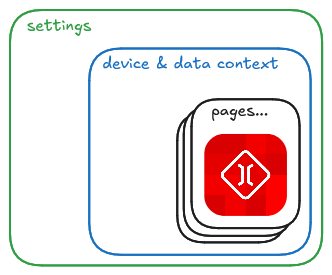
BRIDGE is divided into three primary components:
- Settings: User-mutable parameters.
- Device and Data Context: The central registry for active hardware.
- Pages: The user frontend modules of BRIDGE (Analytics, Visualizer, Connecting to Devices, etc.).
With some sub-components
1. Settings
2. Device and Data Context (DDC)
The DDC is, in short, a global container of actively in-use devices. It holds a container with references to devices we have initialized and registered on the DDC.
Unlike traditional React Contexts, it does not store the actual data streams. Instead, it stores references to BaseDevice class instances.
ALL Pages can access information about devices by interacting with them through the DDC.
In the new architecture, devices are instantiated via a factory in the DeviceRegistry and then registered to the context.
Example 1: 'Fake Device' Connecting
This example involves:
- Grabbing an available device from the DeviceRegistry
- Creating a unique-id for this device
- Calling the
createfactory method for this device, these are defined in the device registry. - Registers the created device into the data context
import React from 'react';
import { useDeviceContext } from '../contexts/DDC';
import { AVAILABLE_DEVICES } from '../DeviceProfiles/DeviceRegistry';
import { DeviceCard } from '../components/DeviceCard';

const DeviceManagerPage: React.FC = () => {
  const { devices, registerDevice } = useDeviceContext();

  const addSimulatedDevice = () => {
    // 1. Find the definition in the Registry
    const def = AVAILABLE_DEVICES.find(d => d.id === 'sim-sine');

    if (def) {
      // 2. Create the instance (Factory Pattern)
      const uniqueId = `sim-${Date.now()}`;
      const deviceInstance = def.create(uniqueId);

      // 3. Register it to the DDC so all pages can see it
      registerDevice(deviceInstance);
    }
  };

  return (
    <IonContent>
      <IonButton onClick={addSimulatedDevice}>Add Sine Wave</IonButton>

      {/* Render cards for every device in the DDC */}
      {Array.from(devices.values()).map(device => (
        <DeviceCard key={device.deviceId} device={device} />
      ))}
    </IonContent>
  );
};
Example 2: 'Fake Device' Usage in other Page
Since useDeviceStream returns a useRef to prevent UI freezing, pages must implement an Intermediary Loop to poll for data at their own pace.
import React, { useState, useEffect } from 'react';
import { useDeviceContext } from '../contexts/DDC';
import { useDeviceStream } from '../hooks/useDeviceStream';
import { useConnectionState } from '../hooks/useConnectionState';

const LiveVisualizer: React.FC = () => {
  const { getDeviceByName } = useDeviceContext();
  const device = getDeviceByName("SimulatedSineWave");

  // 1. Monitor Connection (Triggers re-renders on status change)
  const { isConnected, state } = useConnectionState(device);

  // 2. Monitor Data (Silent Ref - NO re-renders)
  const dataRef = useDeviceStream(device);

  // 3. Local state for UI display
  const [uiValue, setUiValue] = useState<number>(0);

  useEffect(() => {
    // 4. Create a 60fps Polling Loop
    const loop = setInterval(() => {
      if (isConnected && dataRef.current) {
        // Pull data from the silent Ref and trigger a UI update
        setUiValue(dataRef.current.rawData[0]);
      }
    }, 16); // ~60Hz

    return () => clearInterval(loop);
  }, [isConnected]);

  if (!device) return <p>Device not found.</p>;

  return (
    <div>
      <h2>{device.displayName} - {state}</h2>
      <p>Voltage: {uiValue.toFixed(2)}V</p>
    </div>
  );
};
3. Pages
BRIDGE pages are basically individual web-apps that interact with the Device and Data Context.
All pages should have the follwoing capabilties:
- Read Access to Settings (with the exception of a Settings page for altering user mutable parameters)
- Read/Write Access to Device and Data Context
Essential Pages
Some pages that every instance of BRIDGE should have are:
- Connections Page: Allows user to connect to multiple devices for reading and writing data
- Settings Page: Allows user to view and modify some user-mutable parameters that dictate app behavior
- Generic Visualizer Page: Allows user to see the raw output of a given device, OR view the raw data they are sending out
- Useful for debugging
Additional Pages
One can add many additional pages to BRIDGE before a given device's RAM can no longer handle the size of an actively running app. Among some additional pages we consider useful are:
- Training Page: Allows user to record and label data in-app, as well as trigger ML models to train on-device off of labeled data
Components
Device Registry
The DeviceRegistry is used by pages such as a connecting-to-devices-page to have a record of available / supported devices that we can actually attempt to register to the DDC and connect to.
Example... incomplete
// src/DeviceProfiles/DeviceRegistery.ts

import { dummyBLEDevice } from "./dummyBLEDevice";
import { EMGWatchDevice } from "./EMGWatchDevice";
import { NansenseDevice } from "./NansenseDevice";
import { SimulatedDevice } from "./simulatedDevice";
import { EMGWatchRelay } from "./EMGWatchUDPOutputRelay"
import { BaseDevice } from "./baseDevice";

// For uniqueID create, this is done by the connections page using logic that looks like this:
// const uniqueId = `${deviceDef.id}-${Date.now()}`;
// const deviceInstance = deviceDef.create(uniqueId);

// Helpers
// Define the helper type for clarity
export type contextReference = {
   getDeviceByName: (name: string) => BaseDevice | undefined;
};

/**
 * This data type just store information about a device
 */
export interface DeviceDefinition {
    id: string;
    displayName: string;
    description?: string;
    connectionMethod: string;
    isBLE?: boolean;
    filterServiceUUID?: string; // e.g. 868dd84c-29a5-44fb-bc28-98b8ff420fc7
    filterName?: string;
    // Factory function, this creates a new instance.
    // eslint-disable-next-line @typescript-eslint/no-explicit-any
    create: (uniqueID: string, registeredDeviceId?: string, rawDeviceObj?: any, getDeviceFromContext?: contextReference) => any;
}

export const AVAILABLE_DEVICES: DeviceDefinition[] = [
    {
        id: 'simulated-sine-device',
        displayName: 'SimulatedSineDevice',
        connectionMethod: 'local',
        description: 'Generates a sine/cosine wave at 500Hz (default) for testing',
        create: (uniqueId) => new SimulatedDevice(uniqueId, 'SimulatedSineWave', 500)
    },
    {
        id: 'nansense-gloves',
        displayName: 'NansenseGloves',
        connectionMethod: 'local',
        description: 'Generates a sine/cosine wave at 500Hz (default) for testing',
        create: (uniqueId) => new NansenseDevice(uniqueId, 'NansenseDevice', 80085, '127.0.0.1')
    },
    // { id: 'udp-input', name: 'UDP Input', ... }
    {
        id: 'dummyBLE-stream',
        displayName: 'Dummy BLE stream',
        connectionMethod: 'ble',
        isBLE: true,
        filterServiceUUID: "5153bcd7-6cf5-465b-bea5-e7b1f43b00d7",
        filterName: 'Pi_JSON_Server',
        description: 'A dummy BLE device that streams a fairly basic json packet structure',
        create: (uniqueId, registeredDeviceId) => new dummyBLEDevice(uniqueId, 'dummyBLEDevice', registeredDeviceId)
    },
    {
        id: 'EMGWatch',
        displayName: 'Prototype EMGSmartwatch',
        connectionMethod: 'ble',
        isBLE: true,
        filterServiceUUID: "868dd84c-29a5-44fb-bc28-98b8ff420fc7",
        filterName: 'EMCWatch',
        description: 'Our prototype EMG Smartwatch v2.35',
        create: (uniqueId, registeredDeviceId) => new EMGWatchDevice(uniqueId, 'EMGWatchDevice', registeredDeviceId)
    },

    {
        id: 'emg-udp-relay',
        displayName: 'EMG Watch UDP Relay',
        description: 'Automatically finds "EMGWatch" and relays data over UDP.',
        connectionMethod: 'local',

        create: (uniqueID, _registeredId, _rawObj, contextReference) => {
            if (!contextReference || !contextReference.getDeviceByName) {
                throw new Error("EMG Relay required Device Context (DDC) to be passed during creation");
            }

            return new EMGWatchRelay(
                uniqueID,
                'EMG Watch UDP Relay',
                '127.0.0.1',
                9000,
                contextReference // Inject function here.
            )
        }
    }
]
ListenTranscribe
ListenTranscribe is constantly listening to any changes to the internal devices container within the Device and Data Context.
When a new device is added, this component begins listening to active streams and writes them to a log-file (.jsonnl) in the <USER>/Documents/BRIDGE/data folder.
Devices
Devices are defined by unique classes for each device. A Device Class is stored as a .ts (typescript) file that is interacted with by BRIDGE. The Device classess define all of the things needed to interact with a device (i.e., connection, streaming data, sending commands, etc...).
Supported devices are defined by the Device Registry.
Abstract Classes
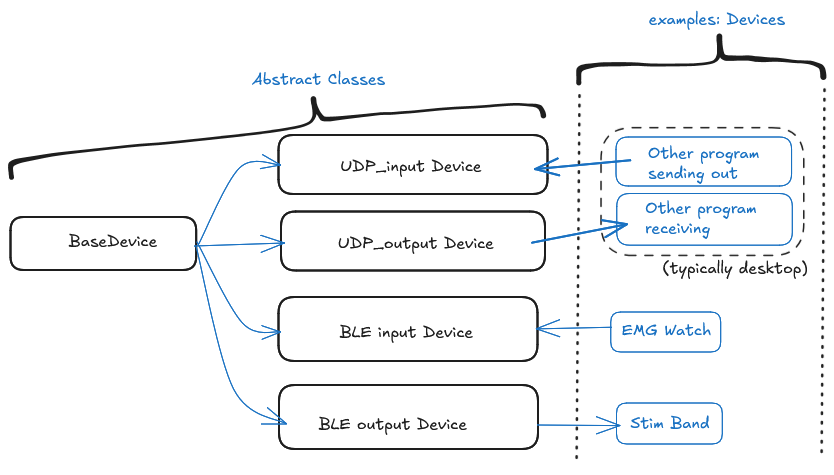
Base Device
The Base Device Class is an Abstract Class which defines specific functions, internal states, and some behavior that ALL DEVICES must have.
All hardware and virtual data sources are defined as Classes extending BaseDevice.
The BaseDevice Contract:
connect() / disconnect(): Async methods to handle hardware handshakes.pushData(data, metadata): Subclasses call this to broadcast new packets.subscribeToData(callback): How hooks/services listen to the stream.subscribeToState(callback): How theuseConnectionStatehook listens.internalBuffer: An optional FIFO queue for storing recent history in RAM.
Simulated Device
Generates a sine-wave and cosine-wave
// src/DeviceProfiles/simulatedDevice.ts

import { BaseDevice } from './baseDevice';

/**
 * Generates a sine wave (x Hz at an amplitude of )
 *
 * @argument deviceId: The string id of the device
 * @argument displayName: The string that displays of this device.
 * @argument frequency: The frequency of the simulated sine / cosine waves.
 */
export class SimulatedDevice extends BaseDevice {
    private intervalID: number | null = null;
    private frequency: number;
    private startTime: number = 0;

    constructor(deviceId: string = "fd001", displayName: string = "FakeDevice001", frequency: number = 500) {
        super(deviceId, displayName);
        this.frequency = frequency;
    }

    async connect(): Promise<void> {
        // 1. Prevent a double connection, do not connect if already connected
        if (this.connectionState == 'connected') return;

        // 2. Update state to notify rest of app
        this.setConnectionState('connecting');

        // 3. Fake a small delay to mimic realy hardware connection. Wait 500 ms
        await new Promise(resolve => setTimeout(resolve, 500));

        // 4. Init timing
        this.startTime = Date.now(); // May want to format this

        // 5. Start the loop (The "Interrupt" stimulation)
        this.intervalID = window.setInterval(() => {
            const t = (Date.now());

            // Generate Data
            const val1 = Math.sin(2 * Math.PI * t);
            const val2 = Math.cos(2 * Math.PI * t);

            // 6. Push Data to listeners
            this.pushData([val1, val2], { frequency: this.frequency} )

        }, 1000 / this.frequency);

        // 7. Finalize State
        this.setConnectionState('connected');
    }

    async disconnect(): Promise<void> {
        // 1. Stop the loop
        if (this.intervalID !== null) {
            window.clearInterval(this.intervalID);
            this.intervalID = null;
        }
        // 2. Update state
        this.setConnectionState('disconnected');
    }


    // These two are mostly unused for this class
    // ----------------------------------------------------------------

    // eslint-disable-next-line @typescript-eslint/no-unused-vars
    protected parsePacket(data: DataView): number[] {
        // Simulated device generates data directly, so parsing isn't needed here.
        // This is just to satisfy the abstract contract.
        return [];
    }

    /**
     *
     * @param command string command. The only accepted command is FREQUENCY: #, where #
     *                is the desired frequency.
     *
     */
    async sendCommand(command: string): Promise<void> {
        if (command.startsWith("FREQUENCY")) {
            const freq = parseInt(command.split(':')[1]);
            this.frequency = freq;
        } else {
            throw Error("Unknown Command: " + command);
        }
    }
}
UDP Input Device
Opens an Electron UDP socket to receive data from external programs (e.g., Python/Unity).
- The UDP Input Device is an Abstract Class
- Inherits properties from Base Device, it still is an abstract class, but will have some specific behavior that all child devices need to have for UDP communication.
- UDP Input Devices inherit connection and streaming behavior from this abstract class.
Key Function:
- It streams data into BRIDGE from a specific UDP port. Typically this will be from some external program running on a desktop.
Recommended Platforms:
- Desktop
// src/DeviceProfiles/UDPInputDevice.ts

import { BaseDevice } from './baseDevice';
import { isElectron } from '../util/platform';

export abstract class UDPInputDevice extends BaseDevice {
    protected port: number;
    protected host: string; // Usually 127.0.0.1
    private socketID: string | null = null;
    private cleanupListener: (() => void) | null = null;

    constructor(deviceID: string, displayName: string, port: number, host: string = '0.0.0.0') {
        super(deviceID, displayName); // Initialize the Base Device abstract class
        this.port = port;
        this.host = host;
    }

    /**
     * Implements generic connection logic for ALL UDP Input devices
     * Bind to a specific UDP socket we are recieving from, register the UDP socket we are sending to
     */
    async connect(): Promise<void> {

        if (!window.bridgeAPI?.electronAPI && !isElectron) {
            throw new Error("UDP input only supported in an Electron environment.")
        }

        if (isElectron) {
            this.setConnectionState('connecting');

            try {
                // 1. Bind to socket
                const result = await window.bridgeAPI.electronAPI.udpBind(this.port, this.host);

                if (!result.success || !result.socketId) {
                    throw new Error(result.error || "Failed to bind to UDP socket");

                }

                this.socketID = result.socketId;
                // Register Global Listener
                // Note: onUdpMessage fires for ALL UDP sockets in the app, we have to filter with socketID
                            // eslint-disable-next-line @typescript-eslint/no-explicit-any
                this.cleanupListener = window.bridgeAPI.electronAPI.onUdpMessage((event: any) => {

                    // 4. Filter: Is this message for this specific UDP device?
                    if (event.socketId == this.socketID) {

                        // Depending on the incoming data we are expecting, this may look different....
                        const view = new DataView(event.buffer.buffer);
                        const parsedData = this.parsePacket(view);


                        // rinfo = remote info, It is a standard object provided by Node.js UDP sockets (and most networking libraries) that tells you who sent the packet.

                            // When a UDP message arrives, the listener provides two things:
                            // 1. msg: The actual data content.
                            // 2. rinfo: The metadata about the sender.

                            // Structure of rinfo
                            // It is a simple object containing:
                            // * address: The IP address of the sender (e.g., '192.168.1.50').
                            // * port: The port the sender used (e.g., 41234).
                            // * family: The IP version (e.g., 'IPv4' or 'IPv6').
                            // * size: The size of the message in bytes.

                            // Why you pass it to pushData
                            // By including { rinfo: event.rinfo } in the metadata of pushData, you allow downstream components to know the source.

                        // 5. Push new data to react

                        // Recall pushData has StreamDataEntries
                        // timestamp: Date.now(),
                        // rawData: parsedData --> typically from bytes,
                        // deviceId: this.deviceId,
                        // metadata --> remote info
                        this.pushData(parsedData, {rinfo: event.rinfo})
                    }
                });

                this.setConnectionState('connected');

            } catch (error) {
                console.error(error);
                this.setConnectionState('error', error instanceof Error ? error.message : String(error));
            }
        }
    }

    /**
     * Disconnect from the UDP connection we are listening on
     */
    async disconnect(): Promise<void> {
        // 1. Stop listening to global events
        if (this.cleanupListener) {
            this.cleanupListener();
            this.cleanupListener = null;
        }

        // 2. Tell Main Process to close the socket
        if (this.socketID && window.bridgeAPI?.electronAPI) {
            await window.bridgeAPI.electronAPI.udpClose(this.socketID);
            this.socketID = null;
        }

        this.setConnectionState('disconnected');
    }


    /**
     * Concrete classess must implement how to turn bytes / data -> parsed data
     * @param data raw bytes to convert to numbers for rawData in a packet
     */
    protected abstract parsePacket(data: DataView | string): number[] | string;

    // async sendCommand(command: string): Promise<void> {
    //     // Does nothing for this device....
    // }
}
UDP Output Device
Can linkTo() any other device to forward its stream over the network.
- The UDP Output Device is an Abstract Class
- Inherits properties from Base Device, it still is an abstract class, but will have some specific behavior that all child devices need to have for UDP communication.
- UDP Output Devices inherit connection and streaming behavior from this abstract class.
- All UDP Output devices should be able to either have pre-defined or user-selectable datastreams that they would want to send out.
- i.e.,
UDP_EMGWatch_output_Device.tswould specifically:- Confirm EMGWatch is connected
- Confirm EMGWatch is streaming
- Subscribe to EMGWatch stream
- Relay EMGWatch live data to port 127.0.0.1 on port 9090 as a UDP stream for program X to listen in on.
- i.e.,
Key Function:
- It streams data out to a specific UDP port. Typically this will be to some external program running on a desktop.
Recommended Platforms:
- Desktop
//  src/DeviceProfiles/UDPOutputDevice.ts

import { BaseDevice, StreamDataEntry } from "./baseDevice";
import { isElectron } from "../util/platform";

// UDPOutputDevice has two main functions
// - Act as a relay for device info
// - Command / Control and external program over UDP

export abstract class UDPOutputDevice extends BaseDevice {
    protected DeviceType: string = 'abstract_class_udpoutputdevice'
    protected targetHost: string;
    protected targetPort: number;

    // Upstream source (optional - if not provided this output device simply is a controller for an external program)

    private socketID: string | null = null;
    private sourceUnsubscribe: (() => void) | null = null;

    // The abstract constructor
    constructor(deviceID: string, displayName: string, host: string, port: number) {
        super(deviceID, displayName);
        this.targetHost = host;
        this.targetPort = port;
    }

    // Connection logic ----------------------------------------------------------------

    /**
     * Bind to a specific UDP socket we are sending from, register the UDP socket we are sending to
     */
    async connect(): Promise<void> {
        if (!window.bridgeAPI.electronAPI && !isElectron) {
            throw new Error("UDPOutputDevice requires Electron!");
        }

        if (isElectron) {
            this.setConnectionState('connecting');
            // Bind to an ephemeral port (0) for outgoing transmission
            try {
                // Bind to an ephemeral port (0) for outgoing transmission
                const res = await window.bridgeAPI.electronAPI.udpBind(0, '0.0.0.0'); // Using 0 as it doesnt really matter what port we transmit front, zero allocates whatever is available
                if (!res.success || !res.socketId) throw new Error(res.error || "Failed to bind UDP socket");

                this.socketID = res.socketId;
                this.setConnectionState('connected');
                console.log(`[${this.DeviceType}] Socket ${this.socketID} ready for transmission to ${this.targetHost}:${this.targetPort}`);
            } catch (error) {
                this.setConnectionState('error', String(error))
            }
        }
    }

    /**
     * Disconnect from all devices we are listening to, close the UDP socket
     */
    async disconnect(): Promise<void> {
        // 1. Unsubscribe from any linked source
        this.unlinkDevices();

        // 2. Close the socket
        if (this.socketID) {
            await window.bridgeAPI.electronAPI.udpClose(this.socketID);
            this.socketID = null;
        }
        this.setConnectionState('disconnected');
    }

    // Device Linking (observer pattern)

    /**
     * Subscribe to a Device byy attatching a local data listener
     * @param sourceDevice
     */
    public linkDevice(sourceDevice: BaseDevice): void {

        // Cleanup exising links if they exist
        this.unlinkDevices();

        // TODO: May want to switch up to use DeviceID assuming they are all unique
        console.log(`[${this.DeviceType}] Linking ${this.displayName} -> ${sourceDevice.displayName}`);

        // Version A. explicitly define function
        // const localDataListener = function(this: any, data) {
        //     this.handleSourceData(data);
        // };

        // const boundLocalDataListener = localDataListener.bind(this);
        // this.sourceUnsubscribe = source.subscribeToData(boundListener);

        // Version B. Using Arrow functions is better

        // Use the BaseDevice subscription method
        //  - Our handleSourceData is being added as a listener to the source device
        //  - the source device pushes to our handleSourceData every time it gets new data...
        this.sourceUnsubscribe = sourceDevice.attachDataListener((data) => {
            this.relaySourceData(data);
        })
    }

    /**
     * Unsubscribe from the device(s) we are listening to.
     */
    public unlinkDevices(): void {
        if (this.sourceUnsubscribe) {
            this.sourceUnsubscribe();
            this.sourceUnsubscribe = null;
        }
    }


    /**
     * Passed as a listener function.
     * Takes a streamDataEntry (packet), performs a transformation, and sends the transformed payload over UDP
     * @param entry A packet in the StreamDataEntry format
     * @returns
     */
    private async relaySourceData(entry: StreamDataEntry) {
        if (this.connectionState !== 'connected' || !this.socketID) { return; }

        try {
            // 1. Let the specific concrete implementation format the data...
            const payload = this.transformPacket(entry);

            // 2. If valid payload, send over UDP
            this.sendPayloadOverUDP(payload);

        } catch (error) {
            console.error(`[${this.DeviceType} ${this.deviceId}] Relay Data Failed: ${error}`);
        }
    }

    /**
     * A more complex implementation of relaySourceData that utilizes some generic abstraction from handleSourceData
     * @param entry A packet from the Device we are listening to data from
     * @returns
     */
    private async relaySourceDataComplex(entry: StreamDataEntry) {
        // We call the generic helper we created
        await this.handleSourceDataGeneric(
            entry,

            // --- ARG 1: The Transform Function ---
            // We wrap the abstract method in an arrow function to preserve 'this'
            // and satisfy the (entry) => T signature.
            (e) => this.transformPacket(e),

            // --- ARG 2: The Handler Function ---
            // This defines WHAT to do with the result.
            // 'payload' is automatically typed as string | number[] (NonNullable)
            async (payload) => {
                await window.bridgeAPI.electronAPI.udpSend(
                    this.socketID!, // Safe to use ! because handleSourceData checked it
                    this.targetHost,
                    this.targetPort,
                    payload
                );
            }
        );
    }

    /**
     * Generic Listener Function you pass into a
     *  `sourceDevice.attachDataListener(...)` statement.
     * @param entry A packet from the Device we are listening to data from
     * @param transformFunction A function that performs some operation on the entry packet (i.e. Calculates MAV and adds it as metadata)
     * @param handlerFunction A function that does something with the output of transformFunction (i.e. sends it out over UDP)
     * @returns
     */
    private async handleSourceDataGeneric<T>(
        entry: StreamDataEntry,
        transformFunction: (entry: StreamDataEntry) => T,
        handlerFunction: (payload: NonNullable<T>) => Promise<void>
    ) {
        if (this.connectionState !== 'connected') { return; }

        try {
            // 1. Let the specific concrete implementation format the data
            const payload = transformFunction(entry);

            // 2. If valid payload, handle
            // We must explicitly check != null to satisfy NonNullable<T>
            if (payload != null) {
                await handlerFunction(payload as NonNullable<T>);
            }

        } catch (error) {
            console.error(`[${this.DeviceType} ${this.deviceId}] handleSourceData Failed: ${error}`);
        }
    }


    /**
     * Sends a (typically jsonic) payload over UDP, if a payload exists
     * @param payload JSON message or array of numbers to send over UDP to external program
     */
    private async sendPayloadOverUDP(payload: string | number[] | null) {
        if (!this.socketID) { throw new Error("No socketID was provided"); }

        if (payload != null) {
            await window.bridgeAPI.electronAPI.udpSend(
                this.socketID,
                this.targetHost,
                this.targetPort,
                payload
            );
            console.log(`[${this.DeviceType}] [${Date.now()}] Payload sent.`)
        } else {
            console.log(`[${this.DeviceType}] Payload was empty, no payload sent.`)
        }
    }

    // UDP output control

    /**
     * Set the target port that we are sending to
     * @param host Host address, typically 127.0.0.1 if on localhost
     * @param port Port, typically any available five-digit address (i.e. 12345).
     *
     * @warning Be weary to provide a port that is already in use, this can cause unexpected behavior
     */
    public setTarget(host: string, port: number): void {
        this.targetHost = host;
        this.targetPort = port;
        console.log(`[${this.DeviceType}] Target updated to ${host}:${port}`);
    }

    // Command / Control Logic

    /**
     * Send command over UDP to the program we are connected to.
     * @param command
     */
    async sendCommand(command: string): Promise<void> {
        if (!this.socketID || this.connectionState !== 'connected') {
            throw new Error("Device not connected")
        }

        await window.bridgeAPI.electronAPI.udpSend(
            this.socketID,
            this.targetHost,
            this.targetPort,
            command
        )

        // Optional: Echo command locally so UI can see what was sent
        // this.pushData([], { type: 'command_sent', value: command })

        // console.log(`[${this.DeviceType}] Sending command: ${command} to ${this.targetHost}:${this.targetPort}`)

    }

    // Abstract Methods, useful but may not be needed...

    /**
     * MUST IMPLEMENT: Formats a data packet into a string for transmission.
     * Converts incoming data entry into a sendable payload. (i.e. Add MAV to outgoing payload)
     * @param entry Untransformed outgoing packet
     */
    protected abstract transformPacket(entry: StreamDataEntry): string | number[] | null;

    // Required by BaseDevice (Input parsing), not really used by output devices...
                // eslint-disable-next-line @typescript-eslint/no-unused-vars
    protected parsePacket(data: DataView): number[] {
        return [];
    }
}
BLE Input Device
Wraps Capacitor Bluetooth LE. Handles notifications and write-commands.
- The BLE Input Device is an Abstract Class
- Inherits properties from Base Device, it still is an abstract class, but will have some specific behavior that all child devices need to have for BLE communication.
- BLE Input Devices inherit connection and streaming behavior from this abstract class.
Key Function:
- It streams data into BRIDGE from a specific BLE connection.
Recommended Platforms:
- Desktop
- Android
- iOS (not tested)
// src/DeviceProfiles/BLEInputDevice.ts

// TODO: The difference between this.deviceId (our internal identifier) and resolvedDeviceId (what BLEClient uses) needs to be more obvious....

import { BaseDevice } from './baseDevice';
import {
    BleClient,
    // BleDevice,
    // ScanResult,
} from '@capacitor-community/bluetooth-le';
// import {
//     isElectron
// } from '../util/platform';

export abstract class BLEInputDevice extends BaseDevice {
    protected mainServiceUUID: string;
    protected dataRxCharacteristicUUID: string;
    protected dataTxCharacteristicUUID: string;

    protected resolvedDeviceId: string;

    private   disconnectFromDevice: (() => void) | null = null;

    constructor(deviceID: string, displayName: string, resolvedDeviceId: string, mainService: string, dataRxCharacteristic: string, dataTxCharacteristic: string) {
        super(deviceID, displayName);
        this.mainServiceUUID = mainService;
        this.dataRxCharacteristicUUID = dataRxCharacteristic;
        this.dataTxCharacteristicUUID = dataTxCharacteristic;
        this.resolvedDeviceId = resolvedDeviceId;
    }

    /**
     * Connects to the BLE Device using the ID provided in the constructor
     * 1. Initializes BLEClient (part of the capacitor-community/bluetooth-le)
     * 2. Connects to the Device
     * 3. Starts Notifications on the Rx Characteristic
     */
    async connect(): Promise<void> {
        // Connect and set the connection state to true
        this.setConnectionState('connecting');

        // Attempt to connect
        try {
            // 1. Ensure BLEClient is intialized (Safe to call repeatedly, but good practice to try)
            // try {
            //     await BleClient.initialize();
            // } catch (error) {
            //     // If already initialized, it might throw and error, we can ignore or log this...
            //     console.warn('BLE Client initialization warning', error);
            // }

            // 2. Connect to the device
            // We pass a disconnect callback to handle unexpected loss of connection

            await BleClient.connect(this.resolvedDeviceId, () => {this.onDeviceDisconnected()});

            // 2a. Negotiate High Speed transmission
            try {
                await BleClient.requestConnectionPriority(this.resolvedDeviceId, 1);
                console.log('[BLEInputDevice] Requested High Connection Priority');
            } catch (error) {
                // This might fail on platforms that don't support it (like Windows sometimes),
                // but it won't crash the app if caught.
                console.warn('[BLEInputDevice] Could not request connection priority:', error);
            }
            // 3. Start Notifications
            await BleClient.startNotifications(
                this.resolvedDeviceId,
                this.mainServiceUUID,
                this.dataRxCharacteristicUUID,
                (value: DataView) => {
                    try {
                        this.handleNotification(value);
                    } catch (error) {
                        console.error(`[BLEInputDevice] Parse error: ${error}`);
                    }
                }
            );

            this.setConnectionState('connected');
            console.log(`[BLEInputDevice] Connected to ${this.displayName} (${this.deviceId}) with resolved Id: ${this.resolvedDeviceId}`)

        } catch (error) {
            console.error(`[BLEInputDevice] Connection Failed:`, error);
            this.setConnectionState('error', error instanceof Error ? error.message : String(error));
        }
    }

    /**
     * Disconnect from
     */
    async disconnect(): Promise<void> {
        if (this.connectionState == 'connected') {
            try {
                // Typically, stop notifcations before disconnecting
                await BleClient.stopNotifications(
                    this.resolvedDeviceId,
                    this.mainServiceUUID,
                    this.dataRxCharacteristicUUID
                );
                await BleClient.disconnect(this.resolvedDeviceId);
            } catch (error) {
                console.warn(`[BLEInputDevice] Error during disconnect:`, error);
            } finally {
                // Always ensure state is updated
                this.setConnectionState('disconnected');
            }
        } else {
            console.info(`[BLEInputDevice] Device already not connected: ${this.connectionState}`)
        }

    }

    /**
     * Handle unexpected disconnection events from the BLE Client
     */
    protected onDeviceDisconnected(): void {
        console.warn(`[BLEInputDevice] Unexpected disconnection from ${this.deviceId}`);
        this.setConnectionState('disconnected');
    }

    /**
     * YOU CHANGE THIS BASED ON DESIRED BEHAVIOR
     * Default behavior: Parse packet -> Push Data using default BaseDevice logic.
     * Override this in subclasses to create custom entries or pipelines.
     * @param data: raw bytes or data to convert to numbers for rawData in a packet
     */
    protected handleNotification(data: DataView): void {
        try {
            // 1. Parse using the device-specific parser
            const parsedData = this.parsePacket(data);

            // 2. Default behavior: Use BaseDevice's pushData
            // (which wraps data in a standard StreamDataEntry)
            this.pushData(parsedData);
        } catch (error) {
            console.error(`[BLEInputDevice] Connection Failed: ${error}`);
        }
    }

    /**
     * Concrete classess must implement how to turn bytes / data -> parsed data
     * @param data raw bytes to convert to numbers for rawData in a packet
     */
    protected abstract parsePacket(data: DataView): number[] | string;


    /**
     * Send a command if a device is connected
     * @param command
     */
    async sendCommand(command: string): Promise<void> {
        // Make use of the dataTx if connected
        if (this.connectionState !== 'connected') {
            throw new Error(`Device ${this.displayName} is not connected.`);
        }

        try {
            // The BleClient object requires DataView to be sent / recieved
            const encoder = new TextEncoder();
            const dataViewCommand = new DataView(encoder.encode(command).buffer);

            await BleClient.write(
                this.resolvedDeviceId,
                this.mainServiceUUID,
                this.dataTxCharacteristicUUID,
                dataViewCommand
            );
        } catch (error) {
            console.error(`[BLEInputDevice] Could not send command to Device ${this.displayName}: ${error}`)
        }

    }
}
BLE Output Device
I dont know if this is actually doable on all devices. This may be a future item to try out.
- The BLE Output Device is an Abstract Class
- Inherits properties from Base Device, it still is an abstract class, but will have some specific behavior that all child devices need to have for BLE communication.
- BLE Output Devices inherit connection and streaming behavior from this abstract class.
Key Function:
- It advertises a new bluetooth device.
- It streams data out on a specific BLE connection.
Recommended Platforms:
- Desktop
Not yet implemented
Wifi Input Device
- The Wifi Input Device is an Abstract Class
- Inherits properties from Base Device, it still is an abstract class, but will have some specific behavior that all child devices need to have for Wifi communication.
- Wifi Input Devices inherit connection and streaming behavior from this abstract class.
Key Function:
- It streams data into BRIDGE from a specific Wifi connection.
Recommended Platforms:
- Desktop
- Android
- iOS (not tested)
Not yet implemented
Wifi Output Device
I dont know if this is actually doable on all devices. This may be a future item to try out.
- The Wifi Output Device is an Abstract Class
- Inherits properties from Base Device, it still is an abstract class, but will have some specific behavior that all child devices need to have for Wifi communication.
- Wifi Output Devices inherit connection and streaming behavior from this abstract class.
Key Function:
- It streams data out from BRIDGE on a specific Wifi connection.
Recommended Platforms:
- Desktop
Not yet implemented
Serial Input Device
- The Serial Input Device is an Abstract Class
- Inherits properties from Base Device, it still is an abstract class, but will have some specific behavior that all child devices need to have for Serial communication.
- Serial Input Devices inherit connection and streaming behavior from this abstract class.
Key Function:
- It streams data into BRIDGE from a specific Serial connection.
Recommended Platforms:
- Desktop
Not yet implemented
Serial Output Device
- The Serial Output Device is an Abstract Class
- Inherits properties from Base Device, it still is an abstract class, but will have some specific behavior that all child devices need to have for Serial communication.
- Serial Output Devices inherit connection and streaming behavior from this abstract class.
Key Function:
- It streams data out from BRIDGE to specific Serial Port connection.
Recommended Platforms:
- Desktop
Not yet implemented